Engine/Effects/Title & Speaker Cards

Title and Speaker Cards

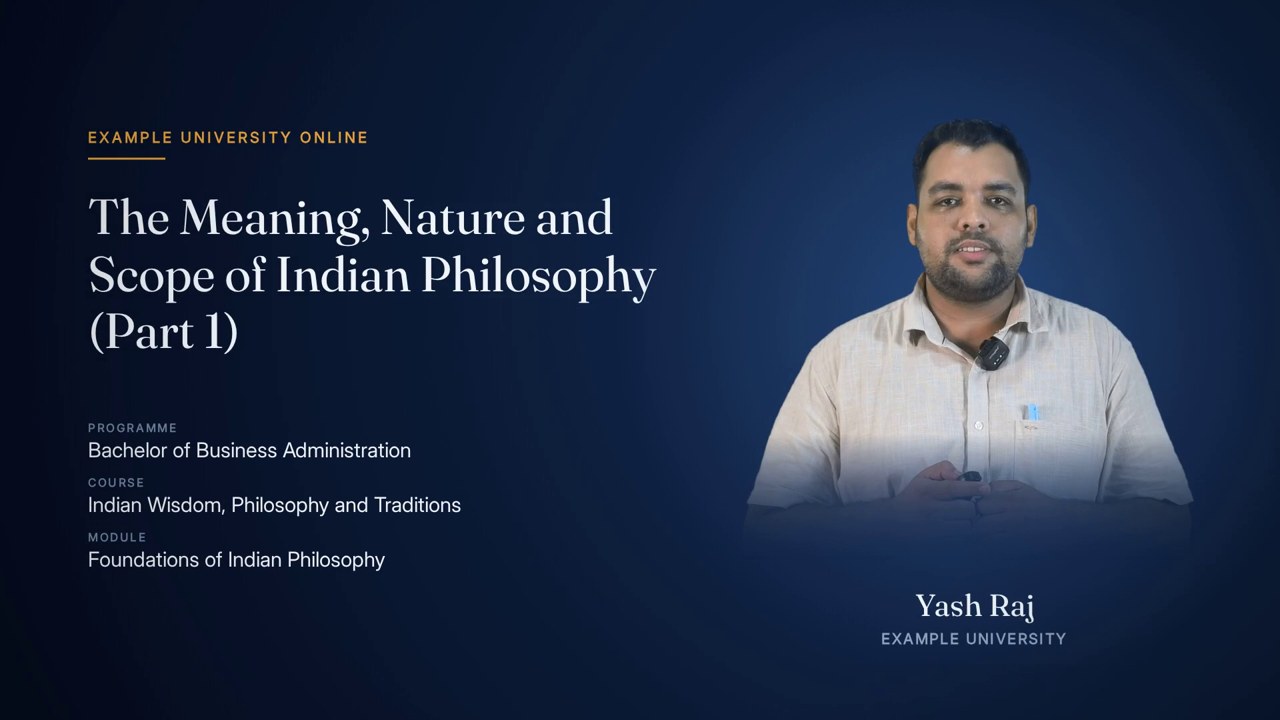
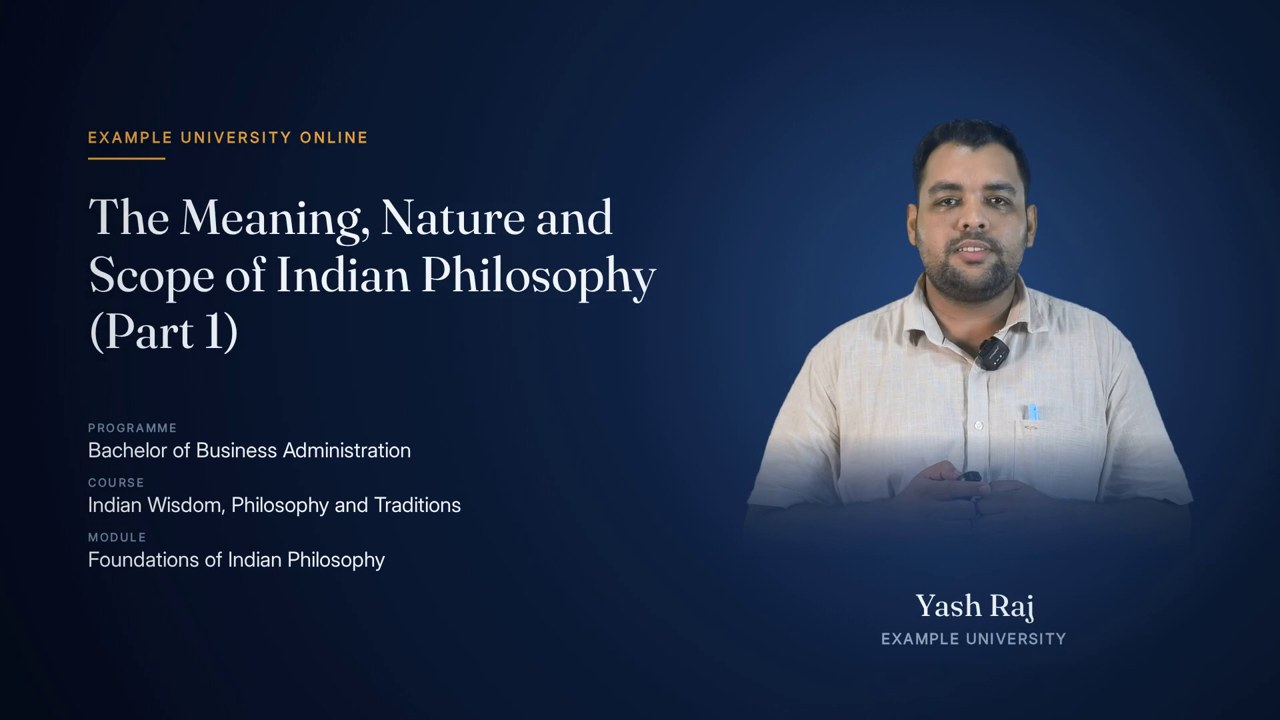
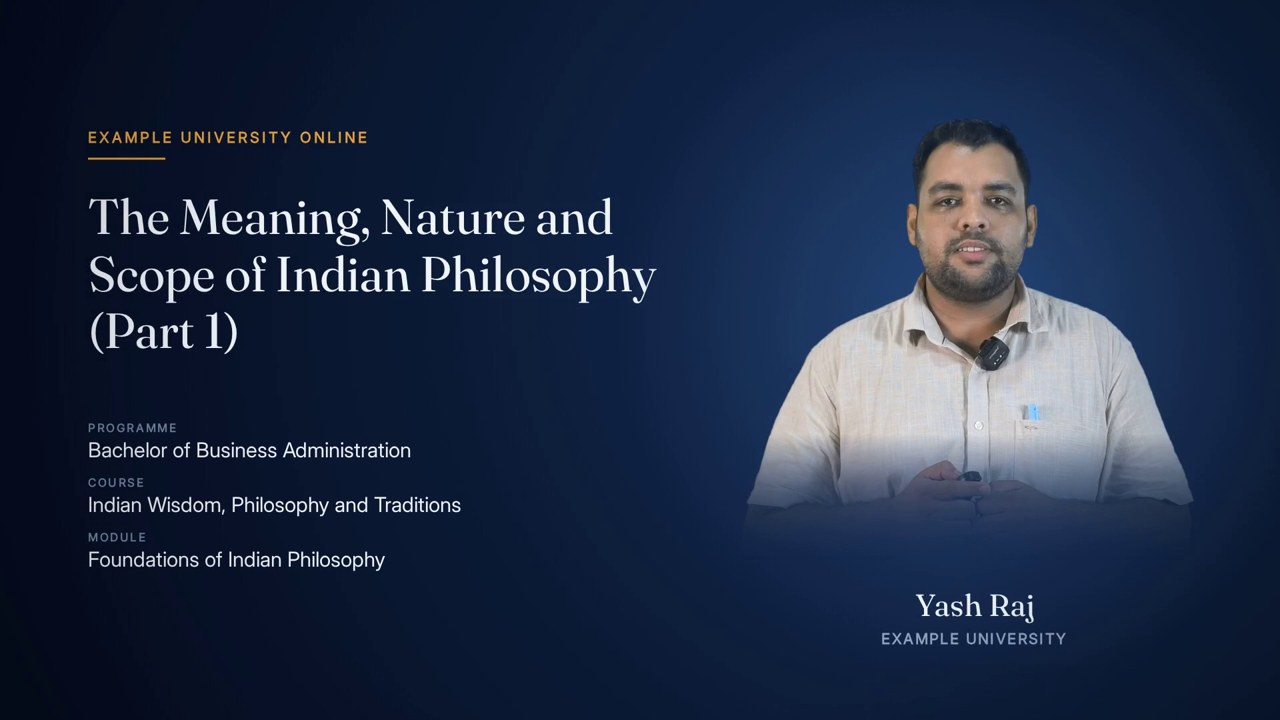
The title slide tells a student, in the order they need it, whose course this is, what today's topic is, where it sits in the programme, and who is teaching it. The topic and three labelled rows arrive down the left, the presenter is cut out of their own recording on the right, and their name and institution arrive last.

programme · course · module · topic · presenter

The finished effect

What it looks like when it is done.

The title card that opens the 22-minute Indian Wisdom lecture used throughout this page: the topic lands first, then programme, course and module, and the presenter's name and institution last. The institution shown is a placeholder.

5 s · 1920 × 1080 · with sound

Overview

What it is, and why it exists.

Course video usually identifies itself with a slide someone typed in presentation software, a different one per lecturer, often with a stock photograph and a misspelt module name. The title slide replaces that with one element drawn by the engine from the course record, laid out identically for every lecture in a programme.

It combines what broadcast television splits in two. The title card names the programme, course, module and topic; the speaker card introduces the presenter with a photograph, name and institution. Here they are one composition: typography on the left, the person on the right, so the student reads the topic and sees the teacher in a single glance. The presenter's picture is not a headshot supplied separately; it is cut out of the lecture itself, so it is certainly the person about to speak, lit and dressed the same way.

The title slide is the element the welcome card and the end-note card are built from. On the welcome it carries the online programme name, the topic, and the programme, course and module; on the end note it carries END OF TOPIC, a thank-you, and the course, module and topic. Timing and music are covered on the Intro and Outro page; this page covers what the card is made of.

It depends on the course sheet row for the recording, the cleaned presenter footage, the measured green-screen key, the measured presenter box, and the lecture's template style.

1920×1080, full frameCanvas
x 132, 950 px wideText column
up to 74 px, fittedTitle size
3, from y 648, 82 px apartRows
690 px tall, centred at x 1462Portrait
46 px, arrives lastName
14 across the lecturePortrait frames scored
about 2.25 s into a 5 s cardFully assembled

How it is made

Step by step, in the order the engine runs it.

Read the course record

The card reads institution, online programme name, programme, course, module, topic and presenter from the lecture's course-sheet row. The presenter is optional: if the byline is not settled, the name line is left off the card rather than guessed.

Choose the portrait frame

Fourteen candidate moments are spread from 8% to 94% of the lecture. At each, the engine measures movement (how much the frame changes over the next fifth of a second) and ordinariness (how far the face region differs from the median face across all fourteen). The frame with the lowest combined score wins, with ordinariness weighted 1.6 times movement. Over a lecture the commonest state of a mouth is closed, so the median face is close to a neutral expression. A person can overrule the choice with a specific time.

Key the presenter out

The chosen frame is keyed with exactly the same measured key and shadow lift as every presenter layout, so the person on the title card and the person in the lecture two minutes later are the same person in the same light.

Clean the matte

Pixels are grouped into connected shapes. The largest is the presenter; anything smaller than 30 pixels, or not overlapping the presenter's columns, is a fleck of backing and is removed. What remains is grown by 3 pixels so nothing of the person is nicked, and the edge is softened by 0.8 pixels so the cut-out does not read as pasted.

Dissolve the bottom edge

The camera, not a decision, cuts the body off at the bottom of the frame. So the bottom 300 pixels of the cut-out fade to transparent on a curve (power 2.2), which makes the portrait sit in the card rather than stand on a hard line.

Lift and crop

The picture is brightened by 10%, because a face lit flat for a green screen looks dull on a dark card. The cut-out is cropped to the presenter with 16 pixels of margin, and clamped to the presenter box measured across the whole lecture, so a stray light stand or dim corner of cloth cannot stretch the crop to the whole frame.

Lay out the left column

Kicker in small capitals at (132, 214) with an amber rule under it; the title from y 292, fitted to a 950×300 px box by trying sizes from 74 px down to 34 px with a line height of 1.16; three rows from y 648, each a small grey label over a 31 px value, 82 px apart.

Place the portrait

The cut-out is scaled to 690 px tall, its width following its own proportions, centred at x 1462 and standing on y 858. Behind it sits a soft pool of blue light, so the cut-out sits in the card rather than on it.

Set the name and institution

Under the portrait, centred on the same x: the name in the display face at 46 px on y 924, and the institution in spaced capitals at 22 px on y 966.

Animate on a clock

Each part fades and rises into place in turn: kicker, portrait, title, the three rows, and finally the name. Timed cards place these as fractions of the card's length; narrated cards place each on the word that names it.

Elements

Everything this effect puts on screen, one piece at a time.

Each element below is shown as the engine actually produced it, with its parts, and the rules that govern it.

The title-slide element as it plays: topic and rows arriving down the left, the presenter on the right, the name last.
01

The complete title slide

The card the lecture opens and closes on.

A full-frame card on the presenter's dark stage. The left column carries the words, the right third carries the person, and nothing else competes: no progress bar, no clock, no slide number, no decorative imagery. It is drawn by the same renderer and fonts as the animated lecture, so it looks like the first frame of the course rather than a slide pasted in front of it.

Anatomy
  • Left column from x 132, 950 px wide
  • Portrait column centred at x 1462
  • Ground: the style's stage radial, lightest at (1430, 430), with a soft vignette
  • Card text colours: ink #F2F5F9, grey #93A6BE, faint label #6F86A3, amber #E8A03A
Rules
  • No lecture chrome on the card
  • Same layout on every lecture in a programme
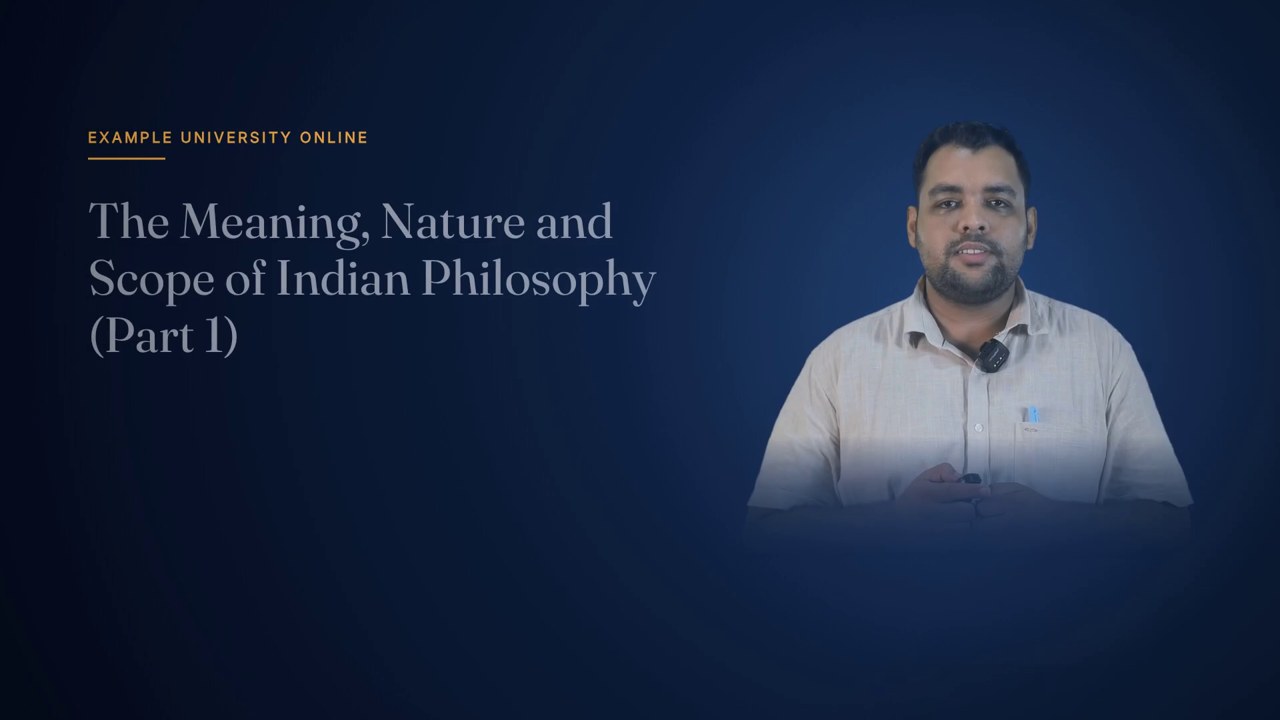
Early in the card: the kicker and the topic title are in, and the presenter is already standing on the right.
02

The kicker

Whose course this is.

The first thing on screen: the institution's online programme name, in spaced small capitals, in amber, with a short amber rule drawn out beneath it. It is the most general line on the card and arrives first, so the student knows the course before anything else.

Anatomy
  • UI face, bold, 22 px, capitals
  • Letter-spacing: the style's tracking plus 1.4 px (4.0 px in Scholar)
  • At (132, 214); amber rule 3 px thick at y 238 growing to 116 px
  • Fades in over 0.5 s
Rules
  • Welcome: online programme name; end note: END OF TOPIC
  • Always the first element to arrive
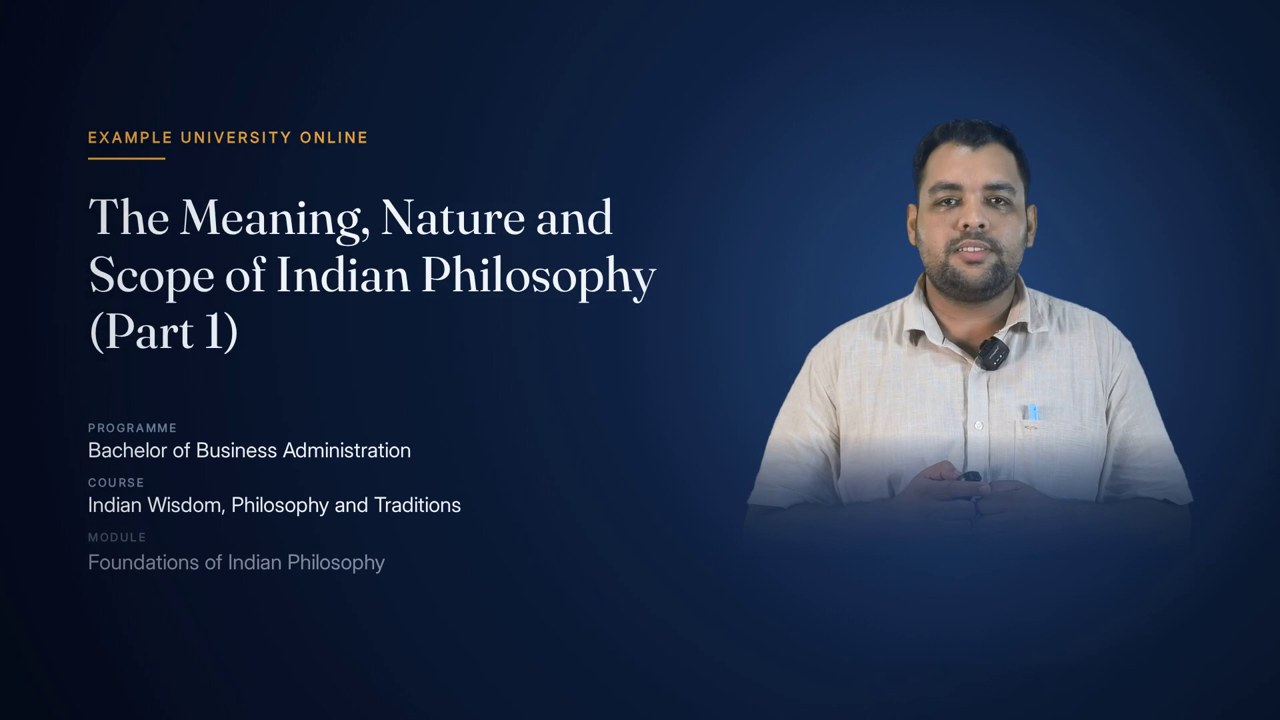
The programme, course and module rows have landed under the title; the presenter's name is only beginning to fade up under the portrait.
03

The title

Today's topic.

The topic in the style's display face, as large as fits. The engine tries sizes from 74 px down to 34 px until the text fits a 950×300 px box, wrapping onto as many lines as needed, so a short topic is set large and a long one such as 'The Meaning, Nature and Scope of Indian Philosophy (Part 1)' still fits without being cut or shrunk to nothing. It lifts 14 px as it fades in.

Anatomy
  • Display face, bold, 74 px down to 34 px
  • Box 950×300 px from y 292
  • Line height 1.16
  • Fades and lifts 14 px over 0.6 s
Rules
  • The topic exactly as the course sheet has it
  • Fitted, never truncated
Every row in, with the presenter's name and institution now fully up under the portrait.
04

The programme rows

Where this lecture sits.

Three labelled rows place the lecture in its programme. On the welcome they read PROGRAMME, COURSE and MODULE, from general to specific; on the end note COURSE, MODULE and TOPIC, restating exactly what was watched. Each is a small, spaced grey label over the value in a clear 31 px sans, arriving one after another.

Anatomy
  • Label: UI face, bold, 17 px, #6F86A3, spaced
  • Value: UI face, 31 px, #F2F5F9, 38 px below its label
  • Rows 82 px apart from y 648
  • Each fades and lifts 8 px over 0.5 s
Rules
  • Always three rows
  • Values come from the course sheet, never retyped
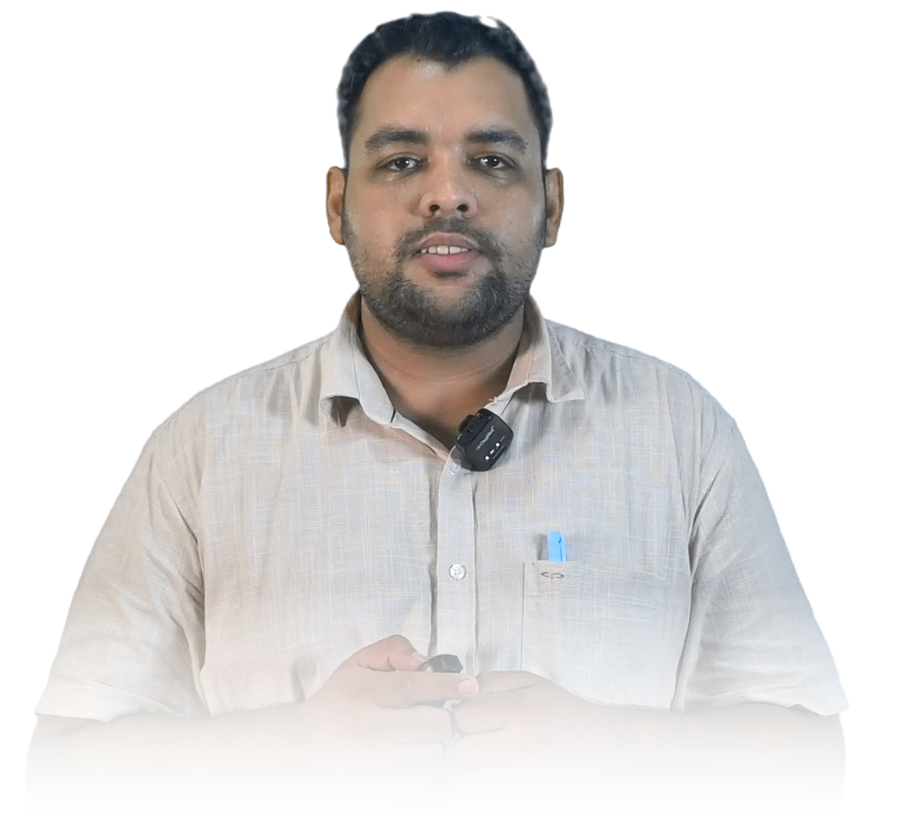
The presenter cut out of his own recording, with the bottom edge dissolved.
05

The presenter cut-out

The person about to speak, from their own recording.

The portrait is a frame of the lecture, chosen to be still and ordinary, keyed with the lecture's own measured key and shadow lift, cleaned of specks, softened at the edge, dissolved at the bottom and brightened by 10%. Using the recording guarantees it is the right person, in the right clothes, in the same light as the film. No separate headshot is needed, and none can go out of date.

Anatomy
  • Frame chosen from 14 candidates, 8% to 94% through the lecture
  • Score: movement + 1.6 × unusualness
  • Specks under 30 px removed, matte grown 3 px, edge softened 0.8 px
  • Bottom 300 px dissolved on a 2.2 curve; brightness ×1.10
  • Cropped with 16 px margin, clamped to the whole-lecture presenter box
Rules
  • Same key and shadow lift as the lecture
  • Never from a supplied photograph
  • A specific frame can be chosen by hand
06

The pool of light

What seats the portrait in the card.

Behind the portrait the renderer paints a soft radial of blue light, centred just above the middle of the figure. Without it a cut-out on a dark ground looks pasted; with it the presenter appears to stand in a lit space on the same set as the rest of the film.

Anatomy
  • Colour rgba(60, 104, 166) at 40% in the centre, fading to nothing
  • Centred at 52% of the portrait's height above its base
  • Radius 78% of the portrait height
Rules
  • Fades in with the portrait
The finished card, held for reading before the lecture begins.
07

Name and institution

The speaker card.

The last thing to arrive: the presenter's name in the display face at 46 px, centred under the portrait, and the institution beneath in spaced capitals. It is the speaker card, the credit a broadcast interview gives a guest. It waits until the rest of the card has landed, so the student's eye moves from what the lecture is to who is teaching it.

Anatomy
  • Name: display face, bold, 46 px, #F2F5F9, centred at x 1462, y 924
  • Institution: UI face, 22 px, #93A6BE, capitals, 2.4 px spacing, y 966
  • Fades in over 0.5 s
Rules
  • Arrives last
  • Left off entirely if the presenter's name is not settled

Rules

The rules, and the reason for each.

Hard rules are checked by the engine and stop delivery if they fail. Guides steer the choice but can give way when the lecture needs it.

TypeRuleWhy
HardEvery word on the card comes from the course-sheet row for the recording.The card cannot disagree with the course record, and nothing is typed twice.
HardIf the presenter's name is not settled, the card carries no name.A recording can read one name off a slide while the sheet carries another; no name is better than the wrong one.
HardThe portrait is cut from the lecture recording itself.It is certainly the person about to speak, in the same clothes and light.
HardThe portrait frame is chosen for stillness and ordinariness together.Stillness alone once chose a held vowel with the mouth open; the median face is close to a neutral expression.
HardThe portrait uses the same key and shadow lift as the lecture.A card where the shadow side is darker than in the film reads as a different recording.
HardWithout a measured key the portrait is not made.Keying with another lecture's green fails quietly.
GuideFlecks of backing are removed; only shapes overlapping the presenter are kept.Creases and light catches key as specks that read as dirt on a dark card.
HardThe portrait crop is clamped to the presenter box measured across the whole lecture.Noise at the frame's edge can otherwise stretch a single-frame crop to the whole frame.
GuideThe body is dissolved at the bottom rather than cut on a line.The sensor cropped the body; a fade makes the portrait sit in the card.
HardTopic, programme, course and module are on the left; the person on the right.The presenter stands on the right in both side-by-side layouts too, so the eye finds them in the same place throughout the film.
HardThe title is fitted between 74 px and 34 px, never truncated.Topics vary from three words to fifteen; every one must be complete.
GuideAlways three rows.Enough to place the lecture, few enough to read in the hold.
GuideElements arrive in order: kicker, portrait, title, rows, name.General to specific, what before who.
GuideThe name arrives last.It is the speaker credit and lands once the card has settled.
HardNo progress bar, clock, slide number or decorative image on the card.The card is not part of the lecture's length, and nothing should compete with topic and person.
HardThe card uses the lecture's renderer, fonts and style tracking.It belongs to the same film.
HardThe portrait is decoded before any frame is drawn.A title card with no presenter on it looks like a bug nobody can reproduce.
GuideIn the narrated version the portrait arrives with the card and the name waits for the words that say it.The portrait belongs to the card; the name belongs to the moment it is spoken.

Settings

Every setting, with its value.

These are the values the engine runs with today. The name in small type is the setting as it appears in the engine, for anyone comparing notes with a producer.

SettingValueWhat it does
Text columnx / wx 132, 950 px wideLeft edge and width of the kicker, title and rows.
Kicker positiony 214; rule at y 238 growing to 116 pxWhere the programme name sits.
Title fit74 px → 34 px, box 950×300 from y 292, line height 1.16Largest size that fits the topic.
Row startrowY648 pxBaseline of the first row's label.
Row spacing82 pxDistance between rows.
Portrait heightportraitH690 pxHeight of the cut-out on the card.
Portrait centreportraitCXx 1462Horizontal centre of portrait, name and institution.
Portrait baseportraitBottomy 858Where the portrait stands; name at +66, institution at +108.
Portrait candidatesn14, from 8% to 94% of the lectureMoments scored for the portrait.
Ordinariness weight1.6 × movementHow much more a neutral face counts than a still one.
Bottom dissolveFADE300 px, curve 2.2How far up from the bottom the portrait fades out.
Portrait exposureLIFT×1.10Brightening against the dark card.
Speck sizeunder 30 px removedKey flecks discarded from the matte.
Edge softening0.8 pxBlur on the matte's edge.
Crop margin16 pxSpace kept around the presenter in the cut-out.
Shadow liftshadow_lift0.35 defaultShared with every presenter layout.
Fade durationskicker 0.5 s, title 0.6 s, rows 0.5 s, portrait 0.7 s, name 0.5 sHow long each part takes to arrive.
Arrival order (timed card)0.10, 0.40, 0.55, 0.95 / 1.25 / 1.55, 1.75 beatsKicker, portrait, title, rows, name; one beat is a fifth of the card.

Checks

What is verified before it ships.

Course record complete

Institution, programme, course, module and topic must be present; the build stops otherwise.

A presenter was found

If the keyed frame contains no presenter, the portrait step stops and points at the key settings.

Portrait inside the measured box

The cut-out's crop is compared with the whole-lecture presenter box and clamped if it runs wider than 1.3 times it or outside it.

Portrait decoded before render

The image is fully decoded before the first frame is requested.

Fonts present

The style's display and UI faces must load; a missing face fails the render rather than falling back silently.

Frame review

Frames at several moments through the card are pulled to confirm the order of arrival and the held final state.

Worked example

In a real lecture

For the Indian philosophy lecture the welcome's kicker reads the institution's online name — EXAMPLE UNIVERSITY ONLINE on this page, a placeholder. The title, 'The Meaning, Nature and Scope of Indian Philosophy (Part 1)', is long enough that the fitting step sets it on several lines below the 74-pixel maximum. The rows read PROGRAMME Bachelor of Business Administration, COURSE Indian Wisdom, Philosophy and Traditions, and MODULE Foundations of Indian Philosophy. Under the portrait: Yash Raj, and the institution's name.

The portrait was keyed from the lecture's own footage with its measured key, and came out 1070×997 pixels with the bottom dissolved. On the card it is scaled to 690 pixels tall, about 740 wide, centred at x 1462.

On the timed welcome the kicker arrived at 0.10 s, the portrait at 0.40 s, the title at 0.55 s, the rows at 0.95, 1.25 and 1.55 s, and the name at 1.75 s. The same element closes the film as the end note, reading END OF TOPIC and 'Thank you for watching.', with the course, module and topic beneath.

BBA-011Course code
1 of 30Topic
1070×997 pxCut-out size
690 px tallPortrait on card
1.75 sName arrives
ScholarStyle

Limits

What it deliberately does not do.

  • It does not produce a separate lower-third over the lecture itself; the speaker is introduced on the welcome and end-note cards.
  • It does not use a supplied headshot or studio portrait; the picture always comes from the recording.
  • It needs a green-screen recording to cut the presenter out; without one the portrait cannot be made.
  • It does not add a designation or department line under the name; it shows the name and the institution.
  • It does not correct the course sheet: a misspelt module name on the sheet appears misspelt on the card.
  • It shows one presenter; co-taught lectures with two people on camera are not laid out for.

Works with

How it meets the other effects.

Questions

What educators ask about it.

Can we send a professional headshot instead?

The card uses a frame from the lecture, so the portrait always matches the person, clothes and lighting in the video. A specific moment can be chosen by hand if the automatic pick is not the one you want.

Can the card show the presenter's title and department?

Today it shows the name and the institution. A designation line is not part of the current layout.

What if a lecture has no confirmed presenter?

Leave the name out of the course sheet and the card is built without it; nothing else changes.

Is there a lower-third during the lecture?

Not yet. The presenter is introduced on the opening card and named again on the closing one.

Will a very long topic fit?

Yes. The title is fitted to its box by stepping down from 74 px, wrapping as needed, to a minimum of 34 px.

All effects

Every effect has a page like this one.

See this effect on your own lecture.

Send a recording and we'll run it through the pipeline as a pilot — one free sample per institution.